Store 存储系统分析
请关注微信公众号:阿呆-bot
概述
本文档分析 spring-ai-alibaba-graph-core 模块中的 Store 存储系统,包括接口设计、实现模式、支持的存储类型和关键设计点。
入口类说明
Store - 存储接口
Store 是长期内存存储的接口,提供跨会话的持久化存储能力,与 CheckpointSaver(短期状态持久化)不同,Store 专注于长期数据管理。
核心职责:
- 提供层次化命名空间支持
- 支持结构化数据存储(Map 格式)
- 提供搜索和过滤功能
- 支持分页查询
- 跨会话数据持久化
关键代码:- public interface Store {
- /**
- * Store an item in the specified namespace with the given key. If an item with the
- * same namespace and key already exists, it will be updated.
- * @param item the item to store
- * @throws IllegalArgumentException if item is null or invalid
- */
- void putItem(StoreItem item);
- /**
- * Retrieve an item from the specified namespace with the given key.
- * @param namespace the hierarchical namespace path
- * @param key the item key
- * @return Optional containing the item if found, empty otherwise
- * @throws IllegalArgumentException if namespace or key is null/invalid
- */
- Optional<StoreItem> getItem(List<String> namespace, String key);
- /**
- * Delete an item from the specified namespace with the given key.
- * @param namespace the hierarchical namespace path
- * @param key the item key
- * @return true if the item was deleted, false if it didn't exist
- * @throws IllegalArgumentException if namespace or key is null/invalid
- */
- boolean deleteItem(List<String> namespace, String key);
- /**
- * Search for items based on the provided search criteria.
- * @param searchRequest the search parameters
- * @return search results with matching items
- * @throws IllegalArgumentException if searchRequest is null
- */
- StoreSearchResult searchItems(StoreSearchRequest searchRequest);
- /**
- * List available namespaces based on the provided criteria.
- * @param namespaceRequest the namespace listing parameters
- * @return list of namespace paths
- * @throws IllegalArgumentException if namespaceRequest is null
- */
- List<String> listNamespaces(NamespaceListRequest namespaceRequest);
- /**
- * Clear all items from the store.
- * <p>
- * <strong>WARNING:</strong> This operation is irreversible and will remove all stored
- * data.
- * </p>
- */
- void clear();
- /**
- * Get the total number of items in the store.
- * @return the number of items stored
- */
- long size();
- /**
- * Check if the store is empty.
- * @return true if the store contains no items, false otherwise
- */
- boolean isEmpty();
- }
BaseStore 为所有 Store 实现提供通用的验证和工具方法,实现了模板方法模式。
核心职责:
- 提供参数验证方法
- 提供键编码/解码工具
- 提供搜索匹配逻辑
- 提供排序比较器
关键代码:- public abstract class BaseStore implements Store {
- /**
- * Validates the putItem parameters.
- * @param item the item to validate
- */
- protected void validatePutItem(StoreItem item) {
- if (item == null) {
- throw new IllegalArgumentException("item cannot be null");
- }
- if (item.getNamespace() == null) {
- throw new IllegalArgumentException("namespace cannot be null");
- }
- if (item.getKey() == null || item.getKey().trim().isEmpty()) {
- throw new IllegalArgumentException("key cannot be null or empty");
- }
- }
- /**
- * Validates the getItem parameters.
- * @param namespace namespace
- * @param key key
- */
- protected void validateGetItem(List<String> namespace, String key) {
- if (namespace == null) {
- throw new IllegalArgumentException("namespace cannot be null");
- }
- if (key == null) {
- throw new IllegalArgumentException("key cannot be null");
- }
- if (key.trim().isEmpty()) {
- throw new IllegalArgumentException("key cannot be empty");
- }
- }
- /**
- * Validates the deleteItem parameters.
- * @param namespace namespace
- * @param key key
- */
- protected void validateDeleteItem(List<String> namespace, String key) {
- if (namespace == null) {
- throw new IllegalArgumentException("namespace cannot be null");
- }
- if (key == null) {
- throw new IllegalArgumentException("key cannot be null");
- }
- if (key.trim().isEmpty()) {
- throw new IllegalArgumentException("key cannot be empty");
- }
- }
- /**
- * Validates the searchItems parameters.
- * @param searchRequest search request
- */
- protected void validateSearchItems(StoreSearchRequest searchRequest) {
- if (searchRequest == null) {
- throw new IllegalArgumentException("searchRequest cannot be null");
- }
- }
- /**
- * Validates the listNamespaces parameters.
- * @param namespaceRequest namespace request
- */
- protected void validateListNamespaces(NamespaceListRequest namespaceRequest) {
- if (namespaceRequest == null) {
- throw new IllegalArgumentException("namespaceRequest cannot be null");
- }
- }
- /**
- * Create store key from namespace and key Uses safe encoding to avoid conflicts from
- * special characters.
- * @param namespace namespace
- * @param key key
- * @return store key
- */
- protected String createStoreKey(List<String> namespace, String key) {
- try {
- Map<String, Object> keyData = new HashMap<>();
- keyData.put("namespace", namespace);
- keyData.put("key", key);
- return Base64.getEncoder().encodeToString(new ObjectMapper().writeValueAsBytes(keyData));
- }
- catch (Exception e) {
- throw new RuntimeException("Failed to create store key", e);
- }
- }
- /**
- * Parse store key to namespace and key.
- * @param storeKey store key
- * @return array containing [namespace, key]
- */
- @SuppressWarnings("unchecked")
- protected Object[] parseStoreKey(String storeKey) {
- try {
- byte[] decoded = Base64.getDecoder().decode(storeKey);
- Map<String, Object> keyData = new ObjectMapper().readValue(decoded, Map.class);
- List<String> namespace = (List<String>) keyData.get("namespace");
- String key = (String) keyData.get("key");
- return new Object[] { namespace, key };
- }
- catch (Exception e) {
- throw new RuntimeException("Failed to parse store key: " + storeKey, e);
- }
- }
StoreItem 表示存储中的单个数据项,包含命名空间、键、值和时间戳。
关键代码:- public class StoreItem implements Serializable {
- /**
- * The hierarchical namespace path for organizing items. For example: ["users",
- * "user123", "preferences"]
- */
- private List<String> namespace;
- /**
- * The unique key within the namespace.
- */
- private String key;
- /**
- * The item value as a structured Map.
- */
- private Map<String, Object> value;
- /**
- * Timestamp when the item was created (milliseconds since epoch).
- */
- private long createdAt;
- /**
- * Timestamp when the item was last updated (milliseconds since epoch).
- */
- private long updatedAt;
- /**
- * Default constructor for serialization frameworks.
- */
- public StoreItem() {
- }
- /**
- * Constructs a StoreItem with the specified namespace, key, and value. Timestamps are
- * set to the current time.
- * @param namespace the hierarchical namespace path
- * @param key the item key
- * @param value the item value
- */
- public StoreItem(List<String> namespace, String key, Map<String, Object> value) {
- this.namespace = namespace;
- this.key = key;
- this.value = value;
- long now = System.currentTimeMillis();
- this.createdAt = now;
- this.updatedAt = now;
- }
- /**
- * Constructs a StoreItem with full parameters including timestamps.
- * @param namespace the hierarchical namespace path
- * @param key the item key
- * @param value the item value
- * @param createdAt creation timestamp (milliseconds since epoch)
- * @param updatedAt last update timestamp (milliseconds since epoch)
- */
- public StoreItem(List<String> namespace, String key, Map<String, Object> value, long createdAt, long updatedAt) {
- this.namespace = namespace;
- this.key = key;
- this.value = value;
- this.createdAt = createdAt;
- this.updatedAt = updatedAt;
- }
- /**
- * Static factory method to create a StoreItem.
- * @param namespace the hierarchical namespace path
- * @param key the item key
- * @param value the item value
- * @return a new StoreItem instance
- */
- public static StoreItem of(List<String> namespace, String key, Map<String, Object> value) {
- return new StoreItem(namespace, key, value);
- }
MemoryStore - 内存存储
基于 ConcurrentHashMap 的内存实现,适用于测试和开发环境。
关键代码:- public class MemoryStore extends BaseStore {
- /**
- * Thread-safe storage for store items. Key format: "namespace1/namespace2/key"
- */
- private final Map<String, StoreItem> storage = new ConcurrentHashMap<>();
- /**
- * Read-write lock for thread safety during search operations.
- */
- private final ReadWriteLock lock = new ReentrantReadWriteLock();
- @Override
- public void putItem(StoreItem item) {
- validatePutItem(item);
- lock.writeLock().lock();
- try {
- String storeKey = createStoreKey(item.getNamespace(), item.getKey());
- storage.put(storeKey, item);
- }
- finally {
- lock.writeLock().unlock();
- }
- }
- @Override
- public Optional<StoreItem> getItem(List<String> namespace, String key) {
- validateGetItem(namespace, key);
- lock.readLock().lock();
- try {
- String storeKey = createStoreKey(namespace, key);
- return Optional.ofNullable(storage.get(storeKey));
- }
- finally {
- lock.readLock().unlock();
- }
- }
- 线程安全(使用 ConcurrentHashMap 和 ReadWriteLock)
- 高性能(内存访问)
- 数据不持久化(应用重启后丢失)
FileSystemStore - 文件系统存储
基于文件系统的持久化存储实现。
特点:
- 数据持久化到本地文件系统
- 支持目录结构组织
- 适合单机部署
DatabaseStore - 数据库存储
基于关系型数据库(MySQL/PostgreSQL)的存储实现。
特点:
RedisStore - Redis 存储
基于 Redis 的存储实现。
特点:
MongoStore - MongoDB 存储
基于 MongoDB 的存储实现。
特点:
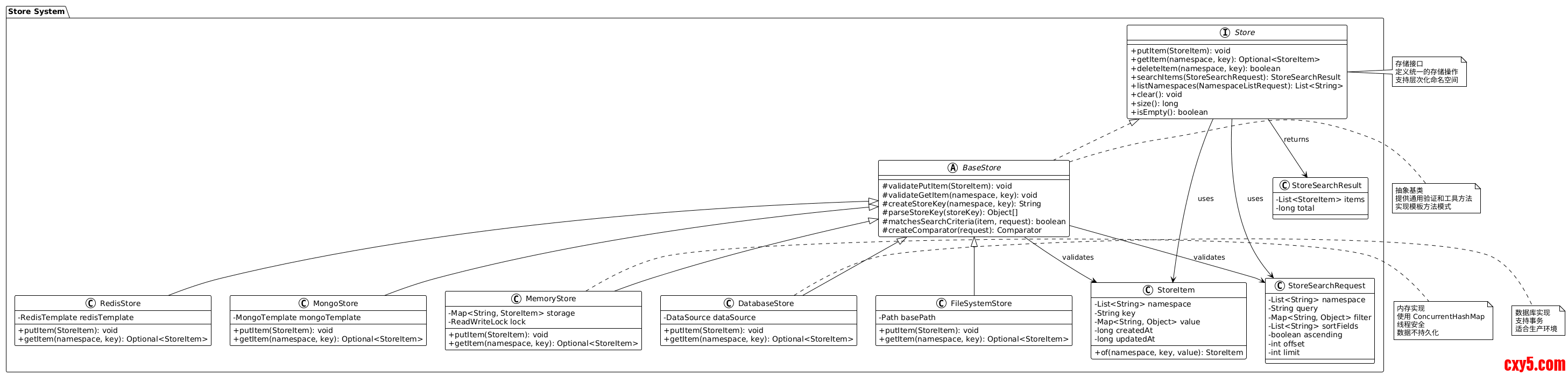
关键类关系图
以下 PlantUML 类图展示了 Store 系统的类关系:
这种设计避免了特殊字符冲突,确保键的唯一性。
3. 搜索和过滤
StoreSearchRequest 支持多种搜索方式:
- 命名空间过滤:在指定命名空间下搜索
- 文本查询:在键和值中搜索文本
- 自定义过滤:基于值的键值对过滤
- 排序:支持多字段排序
- 分页:支持 offset 和 limit
关键代码:- protected boolean matchesSearchCriteria(StoreItem item, StoreSearchRequest searchRequest) {
- // Namespace filter
- List<String> namespaceFilter = searchRequest.getNamespace();
- if (!namespaceFilter.isEmpty() && !startsWithPrefix(item.getNamespace(), namespaceFilter)) {
- return false;
- }
- // Text query filter
- String query = searchRequest.getQuery();
- if (query != null && !query.trim().isEmpty()) {
- String lowerQuery = query.toLowerCase();
- // Search in key
- if (!item.getKey().toLowerCase().contains(lowerQuery)) {
- // Search in value
- String valueStr = item.getValue().toString().toLowerCase();
- if (!valueStr.contains(lowerQuery)) {
- return false;
- }
- }
- }
- // Custom filters
- Map<String, Object> filters = searchRequest.getFilter();
- if (!filters.isEmpty()) {
- Map<String, Object> itemValue = item.getValue();
- for (Map.Entry<String, Object> filter : filters.entrySet()) {
- Object itemVal = itemValue.get(filter.getKey());
- if (!Objects.equals(itemVal, filter.getValue())) {
- return false;
- }
- }
- }
- return true;
- }
1. 模板方法模式
BaseStore 实现了模板方法模式:
- 定义通用的验证和工具方法
- 子类实现具体的存储逻辑
- 确保所有实现的一致性
2. 策略模式
不同的 Store 实现代表不同的存储策略:
- MemoryStore:内存策略(快速但不持久)
- FileSystemStore:文件系统策略(持久但单机)
- DatabaseStore:数据库策略(事务支持)
- RedisStore:缓存策略(高性能)
- MongoStore:文档数据库策略(灵活)
3. 线程安全
- MemoryStore 使用 ConcurrentHashMap 和 ReadWriteLock 确保线程安全
- 其他实现依赖底层存储的线程安全机制
4. 键编码设计
使用 Base64 编码避免特殊字符问题:
- 支持任意命名空间和键名
- 确保键的唯一性
- 便于序列化和反序列化
5. 搜索优化
BaseStore 提供通用的搜索匹配逻辑:
- 命名空间前缀匹配
- 文本包含匹配
- 自定义过滤匹配
- 多字段排序支持
总结说明
核心设计理念
- 统一接口:Store 接口定义统一的存储操作,屏蔽底层实现差异
- 层次化组织:通过命名空间支持数据的层次化组织
- 灵活查询:支持多种搜索和过滤方式
- 可扩展性:通过接口和抽象类支持新的存储实现
支持的存储模式
- 内存模式(MemoryStore):适合测试和开发
- 文件系统模式(FileSystemStore):适合单机部署
- 数据库模式(DatabaseStore):适合生产环境,支持事务
- 缓存模式(RedisStore):适合高性能场景
- 文档数据库模式(MongoStore):适合非结构化数据
关键优势
- 一致性:所有实现遵循相同的接口规范
- 可替换性:不同实现可以无缝替换
- 可扩展性:易于添加新的存储实现
- 类型安全:使用泛型和接口确保类型安全
使用场景
- 长期记忆:Agent 的长期记忆存储
- 知识库:存储结构化知识
- 用户数据:存储用户偏好和配置
- 会话数据:跨会话的数据持久化
来源:程序园用户自行投稿发布,如果侵权,请联系站长删除
免责声明:如果侵犯了您的权益,请联系站长,我们会及时删除侵权内容,谢谢合作! |


 提升卡
提升卡 置顶卡
置顶卡 沉默卡
沉默卡 喧嚣卡
喧嚣卡 变色卡
变色卡 千斤顶
千斤顶 照妖镜
照妖镜