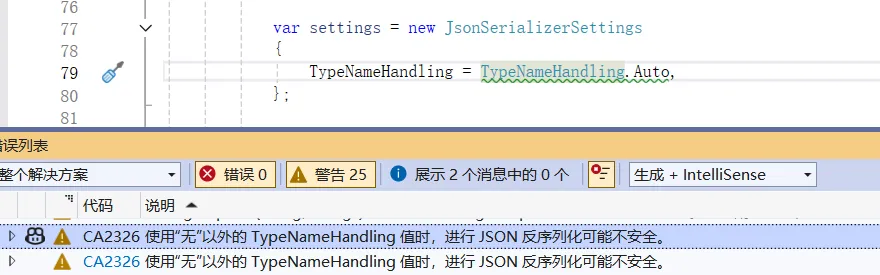
多态反序列化是处理继承结构对象序列化的常见需求,但不同 JSON 序列化库的实现机制差异会带来显著的安全风险。微软 CA2326 规则明确警示:避免使用非安全的 JsonSerializerSettings 配置(如 Newtonsoft.Json 的 TypeNameHandling 非 None 值),否则可能引发类型注入攻击。本文将对比 Newtonsoft.Json 与 System.Text.Json 在多态反序列化中的实现差异,重点分析安全性问题,并通过代码实例验证两者的安全表现。
多态反序列化的实现机制差异
Newtonsoft.Json:基于TypeNameHandling 的灵活设计
Newtonsoft.Json 通过 TypeNameHandling 配置项控制是否在 JSON 中嵌入类型元数据。当设置 TypeNameHandling 支持多态时,JSON 会携带 $type 字段(包含类型的完全限定名和程序集信息),反序列化时直接根据该字段实例化对应类型。这种设计虽然灵活支持多态,但缺乏默认的类型校验机制,攻击者可构造包含恶意类型的 JSON,触发敏感类型实例化。
System.Text.Json:多态配置的安全设计
System.Text.Json 默认不支持多态反序列化,需通过 [JsonDerivedType] 特性或 DerivedTypes 显式声明允许的派生类型。反序列化时仅处理配置过的类型,拒绝未授权的类型注入,从机制上规避了安全风险。
CA2326 规则的警示
CA2326 规则的核心是禁止使用 TypeNameHandling 非 None 值的配置 —— 攻击者可利用 $type 字段构造恶意 JSON,实例化如 ProcessStartInfo(执行系统命令)、FileStream(读写文件)等敏感类型,引发远程代码执行或数据泄露。
代码实例验证
- using Newtonsoft.Json;
- using Newtonsoft.Json.Serialization;
- using System.Diagnostics;
- using System.Text.Json;
- using System.Text.Json.Serialization;
- using System.Text.Json.Serialization.Metadata;
- namespace NewtonsoftSecurityDemo
- {
- [JsonPolymorphic(TypeDiscriminatorPropertyName = "CustomerType")]
- [JsonDerivedType(typeof(PaymentCompletedEvent), "PaymentCompletedEvent")]
- [JsonDerivedType(typeof(OrderCreatedEvent), "OrderCreatedEvent")]
- public class TransactionEvent
- {
- public string EventId { get; set; } = Guid.NewGuid().ToString();
- public DateTime EventTime { get; set; } = DateTime.Now;
- public string OrderId { get; set; }
- // 业务扩展字段(攻击者利用的入口)
- public object ExtData { get; set; }
- }
- public class PaymentCompletedEvent : TransactionEvent
- {
- public decimal Amount { get; set; }
- public string PaymentMethod { get; set; }
- }
- public class OrderCreatedEvent : TransactionEvent
- {
- public string UserId { get; set; }
- public int ItemCount { get; set; }
- }
- // Newtonsoft.Json 安全绑定器(演示白名单校验)
- public class EventSerializationBinder : ISerializationBinder
- {
- // 仅允许的安全类型白名单
- private readonly HashSet<string> _allowedTypes = new()
- {
- "NewtonsoftSecurityDemo.PaymentCompletedEvent",
- "NewtonsoftSecurityDemo.OrderCreatedEvent",
- //"System.Diagnostics.ProcessStartInfo"
- };
- public Type BindToType(string assemblyName, string typeName)
- {
- // 仅允许白名单内的类型
- if (!_allowedTypes.Contains(typeName))
- {
- throw new NotSupportedException($"禁止反序列化未授权类型:{typeName}");
- }
- return Type.GetType($"{typeName}, {assemblyName}") ?? typeof(TransactionEvent);
- }
- public void BindToName(Type serializedType, out string? assemblyName, out string? typeName)
- {
- assemblyName = serializedType.Assembly.FullName;
- typeName = serializedType.FullName;
- }
- }
- class Program
- {
- static void Main(string[] args)
- {
- Console.WriteLine("=== Newtonsoft.Json 命令执行攻击演示 ===");
- Newtonsoft_Attack_ProcessStartInfo();
- Console.WriteLine("\n=== Newtonsoft.Json 文件读取攻击演示 ===");
- Newtonsoft_Attack_FileStream();
- Console.WriteLine("\n=== Newtonsoft.Json 启用 SerializationBinder:安全防护演示 ===");
- Newtonsoft_Secure_WithBinder();
- Console.WriteLine("\n=== System.Text.Json 安全防护演示 ===");
- SystemTextJson_Defense();
- Console.ReadKey();
- }
- /// <summary>
- /// 模拟:注入ProcessStartInfo执行系统命令
- /// </summary>
- static void Newtonsoft_Attack_ProcessStartInfo()
- {
- string maliciousCallbackJson = @$"
- {{
- ""$type"": ""NewtonsoftSecurityDemo.PaymentCompletedEvent, NewtonsoftSecurityDemo"",
- ""EventId"": ""{Guid.NewGuid()}"",
- ""OrderId"": ""ORD_{new Random().Next(1000, 9999)}"",
- ""Amount"": 999.00,
- ""PaymentMethod"": ""Alipay"",
- ""ExtData"": {{
- ""$type"": ""System.Diagnostics.ProcessStartInfo,System.Diagnostics.Process"",
- ""FileName"": ""cmd.exe"",
- ""Arguments"": ""/c echo 'some scripts' > C:\\temp\\attack_log.txt && echo 'doing' >> C:\\temp\\attack_log.txt"",
- ""UseShellExecute"": true
- }}
- }}";
- var settings = new JsonSerializerSettings
- {
- TypeNameHandling = TypeNameHandling.Auto,
- };
- var eventData = Newtonsoft.Json.JsonConvert.DeserializeObject<TransactionEvent>(maliciousCallbackJson, settings);
- Console.WriteLine($"处理订单事件:{eventData.OrderId}");
- if (eventData.ExtData is ProcessStartInfo psi)
- {
- Directory.CreateDirectory("C:\\temp");
- Process.Start(psi);
- Console.WriteLine($" [攻击成功] 执行命令:{psi.Arguments}");
- Console.WriteLine($" [攻击结果] 生成文件:C:\\temp\\attack_log.txt 文件内容:");
- if (File.Exists("C:\\temp\\attack_log.txt"))
- {
- string content = File.ReadAllText("C:\\temp\\attack_log.txt");
- Console.WriteLine($"{content}");
- }
- }
- }
- /// <summary>
- /// 模拟:注入FileInfo读取敏感文件
- /// </summary>
- static void Newtonsoft_Attack_FileStream()
- {
- string targetFile = Path.Combine(Environment.GetFolderPath(Environment.SpecialFolder.Desktop), "appsettings.json");
- if (!File.Exists(targetFile))
- {
- File.WriteAllText(targetFile, "ConnectionString: 123456");
- }
- string maliciousExportJson = @$"
- {{
- ""$type"": ""NewtonsoftSecurityDemo.OrderCreatedEvent, NewtonsoftSecurityDemo"",
- ""OrderId"": ""ORD_{new Random().Next(1000, 9999)}"",
- ""UserId"": ""user_{new Random().Next(100, 999)}"",
- ""ExtData"": {{
- ""$type"": ""System.IO.FileInfo"",
- ""FileName"": ""{targetFile.Replace("\", "\\\")}""
- }}
- }}";
- var settings = new JsonSerializerSettings
- {
- TypeNameHandling = TypeNameHandling.Auto
- };
- var eventData = Newtonsoft.Json.JsonConvert.DeserializeObject<TransactionEvent>(maliciousExportJson, settings);
- Console.WriteLine($"处理订单导出:{eventData.OrderId}");
- // 通过FileInfo读取文件内容(模拟攻击逻辑)
- if (eventData.ExtData is FileInfo fileInfo)
- {
- using (var sr = new StreamReader(fileInfo.OpenRead()))
- {
- string sensitiveContent = sr.ReadToEnd();
- Console.WriteLine($" [攻击成功] 读取敏感文件内容:\n{sensitiveContent}");
- }
- }
- }
- /// <summary>
- /// Newtonsoft.Json 启用SerializationBinder:拦截恶意类型
- /// </summary>
- static void Newtonsoft_Secure_WithBinder()
- {
- string maliciousCallbackJson = @$"
- {{
- ""$type"": ""NewtonsoftSecurityDemo.PaymentCompletedEvent, NewtonsoftSecurityDemo"",
- ""EventId"": ""{Guid.NewGuid()}"",
- ""OrderId"": ""ORD_{new Random().Next(1000, 9999)}"",
- ""Amount"": 999.00,
- ""PaymentMethod"": ""Alipay"",
- ""ExtData"": {{
- ""$type"": ""System.Diagnostics.ProcessStartInfo,System.Diagnostics.Process"",
- ""FileName"": ""cmd.exe"",
- ""Arguments"": ""/c echo 'some scripts' > C:\\temp\\attack_log.txt && echo 'doing' >> C:\\temp\\attack_log.txt"",
- ""UseShellExecute"": true
- }}
- }}";
- var settings = new JsonSerializerSettings
- {
- TypeNameHandling = TypeNameHandling.Auto,
- SerializationBinder = new EventSerializationBinder() // 启用白名单校验
- };
- try
- {
- var eventData = Newtonsoft.Json.JsonConvert.DeserializeObject<TransactionEvent>(maliciousCallbackJson, settings);
- if (eventData.ExtData is ProcessStartInfo)
- {
- Console.WriteLine(" [防护失效] 恶意类型未被拦截(异常)");
- }
- }
- catch (Exception ex)
- {
- Console.WriteLine($" [防护成功] 拦截未授权类型:{ex.Message}");
- }
- }
- /// <summary>
- /// System.Text.Json 安全防护验证
- /// </summary>
- static void SystemTextJson_Defense()
- {
- string maliciousCallbackJson = @$"
- {{
- ""CustomerType"": ""PaymentCompletedEvent"",
- ""EventId"": ""{Guid.NewGuid()}"",
- ""OrderId"": ""ORD_{new Random().Next(1000, 9999)}"",
- ""Amount"": 999.00,
- ""PaymentMethod"": ""Alipay"",
- ""ExtData"": {{
- ""$type"": ""System.Diagnostics.ProcessStartInfo,System.Diagnostics.Process"",
- ""FileName"": ""cmd.exe"",
- ""Arguments"": ""/c echo 'some scripts' > C:\\temp\\attack_log.txt && echo 'doing' >> C:\\temp\\attack_log.txt"",
- ""UseShellExecute"": true
- }}
- }}";
- var eventData = System.Text.Json.JsonSerializer.Deserialize<TransactionEvent>(maliciousCallbackJson);
- Console.WriteLine($" 主对象类型:{eventData.GetType().FullName}");
- Console.WriteLine($" ExtData 实际类型:{eventData.ExtData.GetType().FullName}");
- if (eventData.ExtData is JsonElement)
- {
- Console.WriteLine(" [防护成功] 恶意类型ProcessStartInfo被拦截,ExtData仅保留原始JSON结构,未反序列化为恶意对象");
- }
- else if (eventData.ExtData is ProcessStartInfo)
- {
- Console.WriteLine(" [防护失效] 恶意类型解析成功");
- }
- else
- {
- Console.WriteLine($" [正常业务] 解析到合法类型:{eventData.ExtData.GetType().FullName}");
- }
- Console.WriteLine("\n尝试转换ExtData为ProcessStartInfo:");
- try
- {
- var psi = (ProcessStartInfo)eventData.ExtData;
- Console.WriteLine(" [防护失效] 恶意类型解析成功");
- }
- catch (InvalidCastException ex)
- {
- Console.WriteLine($" [防护成功] 强制转换失败,原因:{ex.Message}");
- }
- }
- }
- }
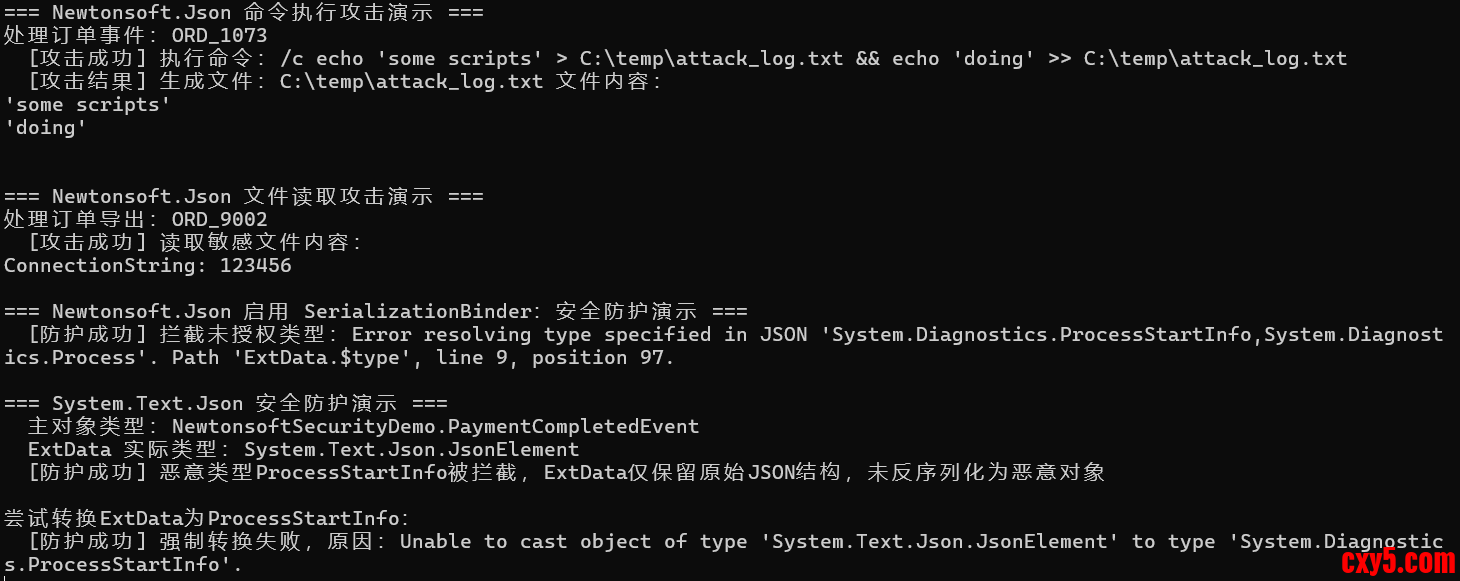
通过 Demo 可以发现:
- Newtonsoft 无防护时攻击成功;
- Newtonsoft 启用 SerializationBinder 后拦截了恶意类型;
- System.Text.Json 始终拦截恶意类型,ExtData 为 JsonElement,无法转换为 ProcessStartInfo。
为什么 Newtonsoft.Json 启用 SerializationBinder 可降低风险?
先看代码:- public class EventSerializationBinder : ISerializationBinder
- {
- // 仅允许的安全类型白名单
- private readonly HashSet<string> _allowedTypes = new()
- {
- "NewtonsoftSecurityDemo.PaymentCompletedEvent",
- "NewtonsoftSecurityDemo.OrderCreatedEvent",
- //"System.Diagnostics.ProcessStartInfo"
- };
- public Type BindToType(string assemblyName, string typeName)
- {
- // 仅允许白名单内的类型
- if (!_allowedTypes.Contains(typeName))
- {
- throw new NotSupportedException($"禁止反序列化未授权类型:{typeName}");
- }
- return Type.GetType($"{typeName}, {assemblyName}") ?? typeof(TransactionEvent);
- }
- public void BindToName(Type serializedType, out string? assemblyName, out string? typeName)
- {
- assemblyName = serializedType.Assembly.FullName;
- typeName = serializedType.FullName;
- }
- }
- 无 SerializationBinder:反序列化器会无条件反射创建 $type 指定的任意类型,包括危险类型;
- 有 SerializationBinder:反序列化器必须经过你的自定义校验逻辑,仅允许白名单内的类型被实例化,直接阻断恶意类型的创建。
小结
Newtonsoft.Json 的 TypeNameHandling 机制虽灵活,但易被利用触发安全漏洞;System.Text.Json 通过显式多态配置白名单的设计,规避了类型注入风险。
在实际开发中,针对多态场景,建议优先使用 System.Text.Json。若必须使用 Newtonsoft.Json,需遵循以下安全实践:
- 避免使用 TypeNameHandling 非 None 值。
- 若必须启用,需严格校验 $type 字段类型的合法性,仅允许安全类型。
我希望您喜欢这篇文章,并一如既往地感谢您阅读并与朋友和同事分享我的文章。
来源:程序园用户自行投稿发布,如果侵权,请联系站长删除
免责声明:如果侵犯了您的权益,请联系站长,我们会及时删除侵权内容,谢谢合作! |



 提升卡
提升卡 置顶卡
置顶卡 沉默卡
沉默卡 喧嚣卡
喧嚣卡 变色卡
变色卡 千斤顶
千斤顶 照妖镜
照妖镜