【Unity Shader Graph 使用与特效实现】专栏-直达
混合模式基础原理
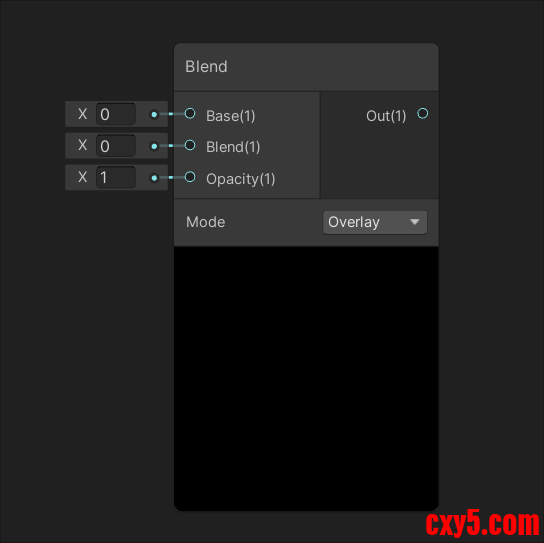
Blend节点的核心功能是通过数学运算实现Base与Blend两个输入值的混合,其通用公式可表示为:Out = Base + Opacity × (Blend - Base)。当Opacity为0时,直接返回Base值;当Opacity为1时,完全采用Blend值。不同混合模式通过修改中间运算逻辑实现特殊视觉效果。
基础混合模式原理
Multiply(正片叠底)
- 原理:Out = Base × Blend
- 数学实现:将Base和Blend的RGB通道逐分量相乘,结果值必然小于或等于输入值
- 应用场景:阴影叠加时,黑色区域(Blend接近0)会使Base颜色变暗,白色区域(Blend接近1)保持Base颜色不变
- 示例:将纹理作为Blend与基础材质混合,实现细节增强效果
Screen(滤色)
- 原理:Out = 1 - (1 - Base) × (1 - Blend)
- 数学实现:通过两次取反运算实现颜色叠加,结果值必然大于或等于输入值
- 应用场景:发光效果处理时,白色区域(Blend接近1)会使Base颜色变亮,黑色区域(Blend接近0)保持Base颜色不变
- 示例:创建辉光效果时,将高光区域作为Blend与基础颜色混合
Overlay(叠加)
- 原理:基于Base亮度选择混合方式:
- Base亮度 > 0.5时:Out = 1 - 2 × (1 - Base) × (1 - Blend)
- Base亮度 ≤ 0.5时:Out = 2 × Base × Blend
- 数学实现:通过条件判断实现非线性混合,增强对比度
- 应用场景:材质细节增强时,暗区变暗、亮区变亮
- 示例:将法线贴图作为Blend与基础材质混合,增强表面凹凸感
对比混合模式原理
Difference(差值)
- 原理:Out = |Base - Blend|
- 数学实现:取两个输入值的绝对差值,结果值在0到1之间
- 应用场景:轮廓检测时,差异明显的区域会呈现高亮效果
- 示例:用于实现边缘检测效果,将两个相似纹理的差异作为Blend
Exclusion(排除)
- 原理:Out = Base + Blend - 2 × Base × Blend
- 数学实现:与Difference类似但对比度更低,结果值在-1到1之间
- 应用场景:特殊视觉风格处理时,生成柔和的反转效果
- 示例:创建故障艺术效果时,将两个纹理的差值作为Blend
Subtract(减去)
- 原理:Out = Base - Blend
- 数学实现:直接相减,结果可能为负值(会被截断为0)
- 应用场景:负片效果处理时,生成颜色反转效果
- 示例:创建负片效果时,将基础颜色与目标颜色相减
明暗混合模式原理
Darken(变暗)
- 原理:Out = min(Base, Blend)
- 数学实现:取两个输入值中较小的分量
- 应用场景:阴影强化时,保留较暗的颜色
- 示例:处理阴影效果时,将阴影颜色作为Blend与基础颜色混合
Lighten(变亮)
- 原理:Out = max(Base, Blend)
- 数学实现:取两个输入值中较大的分量
- 应用场景:高光增强时,保留较亮的颜色
- 示例:创建高光效果时,将高光颜色作为Blend与基础颜色混合
LinearBurn(线性加深)
- 原理:Out = Base + Blend - 1
- 数学实现:将两个输入值相加后减去1,结果值必然小于或等于输入值
- 应用场景:深度阴影渲染时,增强暗部细节
- 示例:处理复杂阴影时,将阴影颜色作为Blend与基础颜色混合
混合模式扩展原理
Color Dodge(颜色减淡)
- 原理:Out = Base / (1 - Blend)
- 数学实现:通过除法运算实现颜色减淡,结果值可能大于1(会被截断为1)
- 应用场景:发光效果处理时,增强亮区效果
- 示例:创建发光效果时,将高光区域作为Blend与基础颜色混合
Color Burn(颜色加深)
- 原理:Out = Base / Blend
- 数学实现:通过除法运算实现颜色加深,结果值可能小于0(会被截断为0)
- 应用场景:暗部细节强化时,增强暗区效果
- 示例:处理暗部细节时,将阴影颜色作为Blend与基础颜色混合
Hard Light(强光)
- 原理:基于Blend亮度选择混合方式:
- Blend亮度 > 0.5时:Out = 1 - (1 - Base) × (1 - (2 × Blend - 1))
- Blend亮度 ≤ 0.5时:Out = 2 × Base × Blend
- 数学实现:通过条件判断实现非线性混合,增强对比度
- 应用场景:材质增强时,根据混合层亮度决定叠加方式
- 示例:将法线贴图作为Blend与基础材质混合,增强表面凹凸感
高级混合模式原理
Soft Light(柔光)
- 原理:基于Blend亮度选择混合方式:
- Blend亮度 > 0.5时:Out = Base + (1 - 2 × Base) × (Blend - 0.5)
- Blend亮度 ≤ 0.5时:Out = Base × (1 + 2 × (Blend - 0.5))
- 数学实现:通过条件判断实现非线性混合,效果比Hard Light更柔和
- 应用场景:自然过渡处理时,实现柔和的光照效果
- 示例:创建柔和光照效果时,将光照颜色作为Blend与基础颜色混合
Vivid Light(鲜艳光)
- 原理:结合Color Dodge和Color Burn:
- Blend亮度 > 0.5时:Out = Base / (1 - (2 × Blend - 1))
- Blend亮度 ≤ 0.5时:Out = Base / (2 × Blend - 1)
- 数学实现:通过条件判断实现高对比鲜艳效果
- 应用场景:特殊视觉风格处理时,生成高对比鲜艳效果
- 示例:创建特殊视觉效果时,将纹理作为Blend与基础颜色混合
Linear Light(线性光)
- 原理:结合LinearDodge和LinearBurn:
- Blend亮度 > 0.5时:Out = Base + (2 × Blend - 1)
- Blend亮度 ≤ 0.5时:Out = Base + (2 × Blend - 1) - 1
- 数学实现:通过条件判断实现动态光照效果
- 应用场景:动态光照处理时,生成线性光照效果
- 示例:创建动态光照效果时,将光照颜色作为Blend与基础颜色混合
新增混合模式原理
Divide(除法)
- 原理:Out = Base / (Blend + 0.000000000001)
- 数学实现:通过除法运算实现颜色分离,结果值可能大于1或小于0
- 应用场景:颜色分离效果处理时,生成高对比度视觉风格
- 示例:创建特殊视觉效果时,将纹理作为Blend与基础颜色进行除法运算
LinearDodge(线性减淡)
- 原理:Out = Base + Blend
- 数学实现:通过加法运算实现颜色减淡,结果值可能大于1
- 应用场景:发光效果处理时,增强亮区效果
- 示例:创建发光效果时,将高光区域作为Blend与基础颜色相加
LinearLightAddSub(线性光加减)
- 原理:基于Blend亮度选择混合方式:
- Blend亮度 > 0.5时:Out = Base + (2 × Blend - 1)
- Blend亮度 ≤ 0.5时:Out = Base + (2 × Blend - 1) - 1
- 数学实现:通过条件判断实现动态光照效果
- 应用场景:动态光照处理时,生成线性光照效果
- 示例:创建动态光照效果时,将光照颜色作为Blend与基础颜色混合
PinLight(点光)
- 原理:基于Base亮度选择混合方式:
- Base亮度 > 0.5时:Out = max(Base, Blend)
- Base亮度 ≤ 0.5时:Out = min(Base, Blend)
- 数学实现:通过条件判断实现点光效果
- 应用场景:特殊视觉效果处理时,生成点光效果
- 示例:创建点光效果时,将光照颜色作为Blend与基础颜色混合
特殊混合模式原理
Overwrite(覆盖)
- 原理:Out = Blend
- 数学实现:完全采用Blend值,不保留Base值
- 应用场景:完全覆盖基础层时,不保留基础层信息
- 示例:创建完全覆盖效果时,将目标颜色作为Blend与基础颜色混合
Negation(负片)
- 原理:Out = 1 - Base × Blend
- 数学实现:生成基础层与混合层的颜色反转效果
- 应用场景:特殊视觉风格处理时,创建负片效果
- 示例:创建负片效果时,将基础颜色与目标颜色相乘后取反
Hard Mix(硬混合)
- 原理:结合Difference和颜色混合:
- Out = abs(Base - Blend)
- 根据差值结果决定最终颜色
- 数学实现:通过差值运算实现高对比硬边效果
- 应用场景:特殊视觉风格处理时,生成高对比硬边效果
- 示例:创建硬边效果时,将两个纹理的差值作为Blend与基础颜色混合
具体实现
Burn- void Unity_Blend_Burn_float4(float4 Base, float4 Blend, float Opacity, out float4 Out)
- {
- Out = 1.0 - (1.0 - Blend)/Base;
- Out = lerp(Base, Out, Opacity);
- }
- void Unity_Blend_Darken_float4(float4 Base, float4 Blend, float Opacity, out float4 Out)
- {
- Out = min(Blend, Base);
- Out = lerp(Base, Out, Opacity);
- }
- void Unity_Blend_Difference_float4(float4 Base, float4 Blend, float Opacity, out float4 Out)
- {
- Out = abs(Blend - Base);
- Out = lerp(Base, Out, Opacity);
- }
- void Unity_Blend_Dodge_float4(float4 Base, float4 Blend, float Opacity, out float4 Out)
- {
- Out = Base / (1.0 - Blend);
- Out = lerp(Base, Out, Opacity);
- }
- void Unity_Blend_Divide_float4(float4 Base, float4 Blend, float Opacity, out float4 Out)
- {
- Out = Base / (Blend + 0.000000000001);
- Out = lerp(Base, Out, Opacity);
- }
- void Unity_Blend_Exclusion_float4(float4 Base, float4 Blend, float Opacity, out float4 Out)
- {
- Out = Blend + Base - (2.0 * Blend * Base);
- Out = lerp(Base, Out, Opacity);
- }
- void Unity_Blend_HardLight_float4(float4 Base, float4 Blend, float Opacity, out float4 Out)
- {
- float4 result1 = 1.0 - 2.0 * (1.0 - Base) * (1.0 - Blend);
- float4 result2 = 2.0 * Base * Blend;
- float4 zeroOrOne = step(Blend, 0.5);
- Out = result2 * zeroOrOne + (1 - zeroOrOne) * result1;
- Out = lerp(Base, Out, Opacity);
- }
- void Unity_Blend_HardMix_float4(float4 Base, float4 Blend, float Opacity, out float4 Out)
- {
- Out = step(1 - Base, Blend);
- Out = lerp(Base, Out, Opacity);
- }
- void Unity_Blend_Lighten_float4(float4 Base, float4 Blend, float Opacity, out float4 Out)
- {
- Out = max(Blend, Base);
- Out = lerp(Base, Out, Opacity);
- }
- void Unity_Blend_LinearBurn_float4(float4 Base, float4 Blend, float Opacity, out float4 Out)
- {
- Out = Base + Blend - 1.0;
- Out = lerp(Base, Out, Opacity);
- }
- void Unity_Blend_LinearDodge_float4(float4 Base, float4 Blend, float Opacity, out float4 Out)
- {
- Out = Base + Blend;
- Out = lerp(Base, Out, Opacity);
- }
- void Unity_Blend_LinearLight_float4(float4 Base, float4 Blend, float Opacity, out float4 Out)
- {
- Out = Blend < 0.5 ? max(Base + (2 * Blend) - 1, 0) : min(Base + 2 * (Blend - 0.5), 1);
- Out = lerp(Base, Out, Opacity);
- }
- void Unity_Blend_LinearLightAddSub_float4(float4 Base, float4 Blend, float Opacity, out float4 Out)
- {
- Out = Blend + 2.0 * Base - 1.0;
- Out = lerp(Base, Out, Opacity);
- }
- void Unity_Blend_Multiply_float4(float4 Base, float4 Blend, float Opacity, out float4 Out)
- {
- Out = Base * Blend;
- Out = lerp(Base, Out, Opacity);
- }
- void Unity_Blend_Negation_float4(float4 Base, float4 Blend, float Opacity, out float4 Out)
- {
- Out = 1.0 - abs(1.0 - Blend - Base);
- Out = lerp(Base, Out, Opacity);
- }
- void Unity_Blend_Overlay_float4(float4 Base, float4 Blend, float Opacity, out float4 Out)
- {
- float4 result1 = 1.0 - 2.0 * (1.0 - Base) * (1.0 - Blend);
- float4 result2 = 2.0 * Base * Blend;
- float4 zeroOrOne = step(Base, 0.5);
- Out = result2 * zeroOrOne + (1 - zeroOrOne) * result1;
- Out = lerp(Base, Out, Opacity);
- }
- void Unity_Blend_PinLight_float4(float4 Base, float4 Blend, float Opacity, out float4 Out)
- {
- float4 check = step (0.5, Blend);
- float4 result1 = check * max(2.0 * (Base - 0.5), Blend);
- Out = result1 + (1.0 - check) * min(2.0 * Base, Blend);
- Out = lerp(Base, Out, Opacity);
- }
- void Unity_Blend_Screen_float4(float4 Base, float4 Blend, float Opacity, out float4 Out)
- {
- Out = 1.0 - (1.0 - Blend) * (1.0 - Base);
- Out = lerp(Base, Out, Opacity);
- }
- void Unity_Blend_SoftLight_float4(float4 Base, float4 Blend, float Opacity, out float4 Out)
- {
- float4 result1 = 2.0 * Base * Blend + Base * Base * (1.0 - 2.0 * Blend);
- float4 result2 = sqrt(Base) * (2.0 * Blend - 1.0) + 2.0 * Base * (1.0 - Blend);
- float4 zeroOrOne = step(0.5, Blend);
- Out = result2 * zeroOrOne + (1 - zeroOrOne) * result1;
- Out = lerp(Base, Out, Opacity);
- }
- void Unity_Blend_Subtract_float4(float4 Base, float4 Blend, float Opacity, out float4 Out)
- {
- Out = Base - Blend;
- Out = lerp(Base, Out, Opacity);
- }
- void Unity_Blend_VividLight_float4(float4 Base, float4 Blend, float Opacity, out float4 Out)
- {
- float4 result1 = 1.0 - (1.0 - Blend) / (2.0 * Base);
- float4 result2 = Blend / (2.0 * (1.0 - Base));
- float4 zeroOrOne = step(0.5, Base);
- Out = result2 * zeroOrOne + (1 - zeroOrOne) * result1;
- Out = lerp(Base, Out, Opacity);
- }
- void Unity_Blend_Overwrite_float4(float4 Base, float4 Blend, float Opacity, out float4 Out)
- {
- Out = lerp(Base, Blend, Opacity);
- }
材质系统设计
- 基础材质层:使用Multiply模式叠加纹理贴图
- 细节层:使用Overlay模式添加法线贴图
- 高光层:使用Screen模式实现发光效果
- 阴影层:使用LinearBurn模式增强深度感
后处理效果实现
- 辉光效果:结合Screen和Color Dodge模式
- 景深效果:使用Multiply模式模拟距离衰减
- 色调分离:通过Difference模式实现颜色分离
动态效果控制
- 过渡动画:通过Opacity参数控制混合强度变化
- 环境响应:根据光照强度动态调整混合模式
- 交互反馈:通过混合模式变化实现视觉反馈
性能优化建议
- 模式选择:移动端优先使用基础混合模式(Multiply/Screen)
- 层级控制:限制混合层级不超过3层
- 参数优化:避免使用高精度浮点运算
- LOD技术:根据距离简化混合效果
常见问题解决方案
混合效果异常
- 检查Base和Blend的输入值范围
- 验证Opacity参数是否在0-1之间
- 确认混合模式选择是否符合预期
性能问题
- 减少混合节点使用数量
- 简化混合模式复杂度
- 检查是否有不必要的混合操作
兼容性问题
- 测试目标平台支持情况
- 准备替代混合模式方案
- 使用Fallback机制处理不支持的模式
<blockquote>
【Unity Shader Graph 使用与特效实现】专栏-直达
(欢迎点赞留言探讨,更多人加入进来能更加完善这个探索的过程,
来源:程序园用户自行投稿发布,如果侵权,请联系站长删除
免责声明:如果侵犯了您的权益,请联系站长,我们会及时删除侵权内容,谢谢合作! |


 提升卡
提升卡 置顶卡
置顶卡 沉默卡
沉默卡 喧嚣卡
喧嚣卡 变色卡
变色卡 千斤顶
千斤顶 照妖镜
照妖镜